The problem
Most market garden layouts start on graph paper or in a spreadsheet. Both work until something changes. Move one bed, widen a path or swap a crop, and every count downstream has to be worked out again by hand: how many beds fit across the field, how many plants go in each, how much ground is still open.
Counts also drift. One person counts plants from the bed edge, another leaves a gap at each end, and the seed order no longer matches what goes in the ground.
How it works
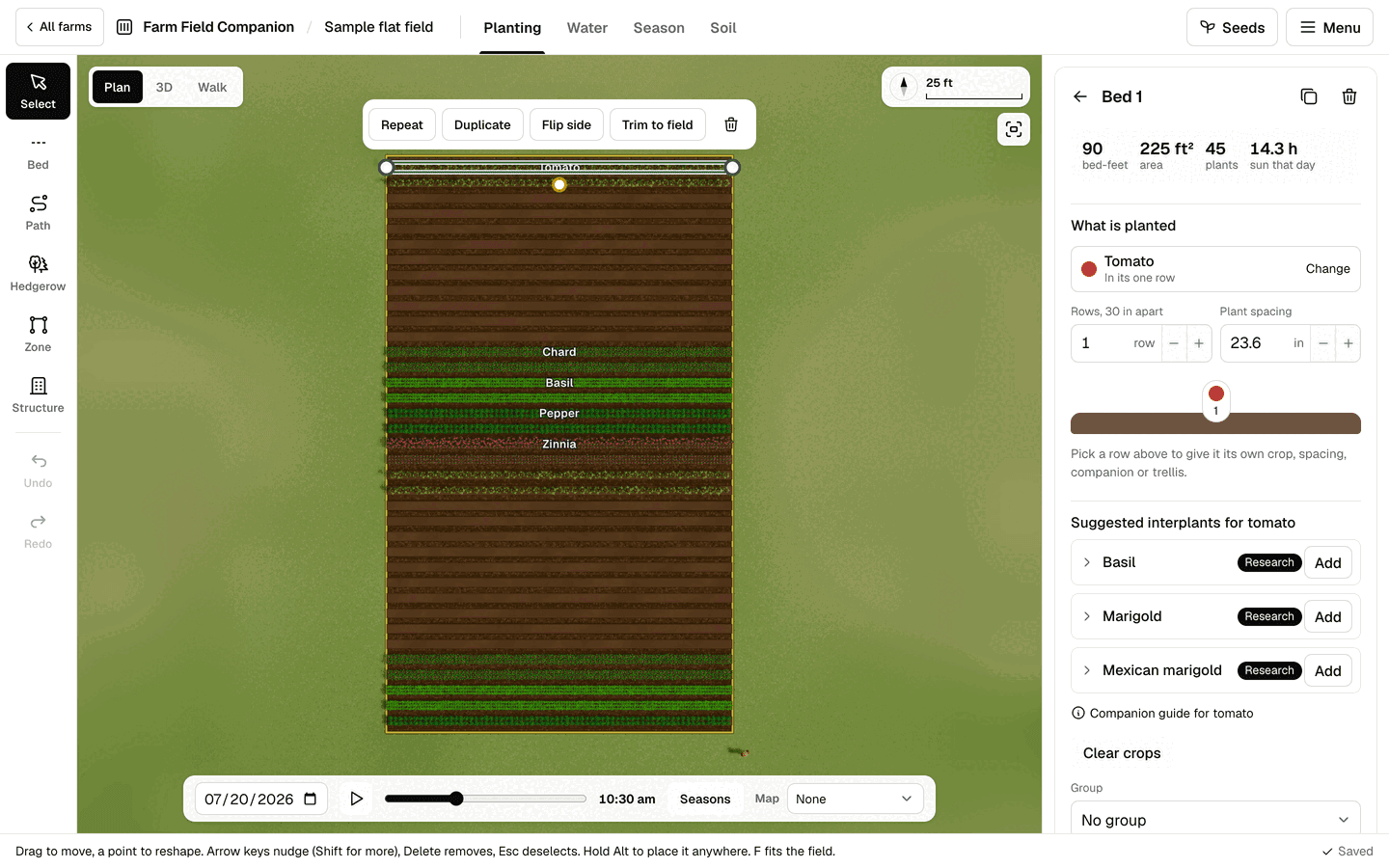
You start from your field’s outline, drawn on a grid or typed as a width and depth, with its main edge set by a compass bearing. Beds are laid square to that edge by default. From there you draw directly on the field:
- Beds with a straight line or a pen for curves, at the width you work in. One step fills the field with beds and paths to start from.
- Repeat copies a bed across the field with a path between each copy, and says how many copies would land on a bed already there before you add them.
- Paths, hedgerows and zones, and structures built to real sizes: trellises, shade structures, compost bays, raised beds and a storage shed.
- Spiral beds and planting mounds, including a Three Sisters mound.
- Bed groups, so a block of beds can be colored and read together.
Each bed holds rows, and each row has its own crop. The plant count follows one rule everywhere: a row holds its length divided by the spacing, rounded down, with half a spacing clear at each end. The design summary shows how much of the field is used, and the whole plan can be seen in 3D, or walked at eye level to check it reads the way you meant.
Companion planting, with its sources
When you choose a crop for a row, the planner suggests a few plants that pair well with it, between rows, along the edge or tucked among the main crop. Each pairing carries a badge for its evidence: Research, Extension or Traditional, and the companion guide lists where each claim comes from. A plant with no sourced guidance says so. Suggestions are only ever suggestions: nothing companion related blocks a planting.
What it does not do
A flat field is shown as level ground in full sun from sunrise to sunset, so slope and nearby trees or buildings are not modeled. Only the shade structures you draw cast shade. Sizes are about right, not exact to the inch, and plant figures are typical planning values that you should change for your own varieties. Measure on the ground before you build anything permanent.
Questions
- How many plants fit in a bed?
- Each row holds its length divided by the spacing, rounded down, with half a spacing clear at each end. A 100 ft row at 12 in holds 100 plants; a 30 ft row at 9 in holds 40. A bed holds the sum of its rows.
- Can I change the spacing for a crop?
- Yes. Spacing, height and spread come from typical planning values, and every planting can be changed to suit your own varieties and habits.
- Do companion suggestions stop me planting something?
- No. They are suggestions with their evidence shown beside them. Nothing you plant is ever refused because of a companion rule.
- Can I lay out beds that are not straight?
- Yes. Beds can follow a curve drawn with the pen, and the planner also lays out spiral beds and round planting mounds.
See also
- Succession planting planner: Sowing dates, successions and harvest by the week for every bed, on one timeline.
- Seed inventory and seed planner: Seed on hand, what this year’s plan needs and by when, and what is left to buy.
- All features, and pricing: one subscription for every flat field you own.