The problem
A steady harvest comes from sowing in small batches, and small batches are hard to keep track of. A planting calendar in a spreadsheet says when to sow, but not where, and not whether the bed is still full of the last crop. A drawing of the field says where, but not when.
The result is familiar: three weeks of lettuce at once and then none, or a bed left open in August that could have held a fall crop.
How it works
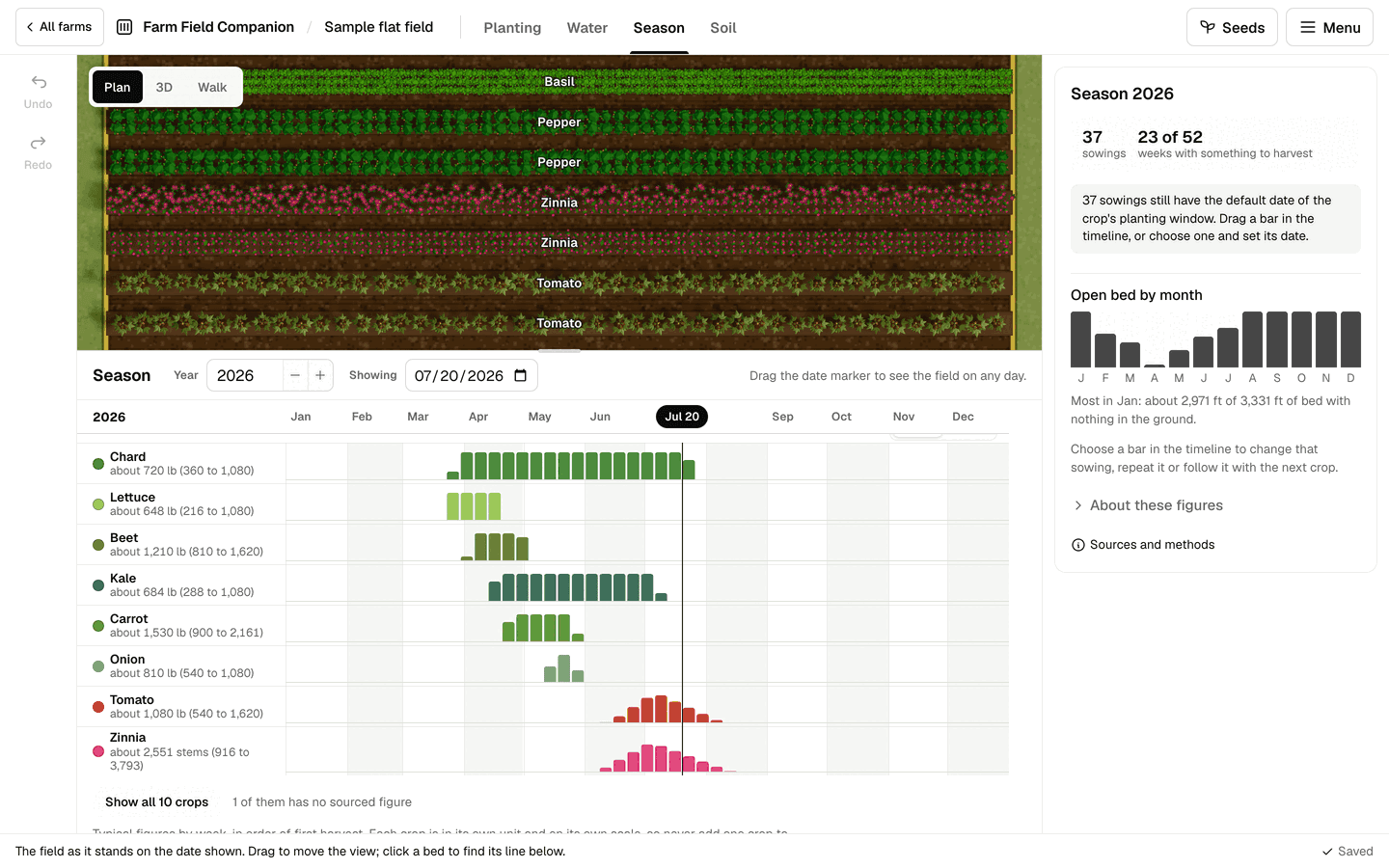
Season mode puts time and place together. The plan of your field sits above a timeline, and every bed has a line showing what is in it, month by month.
- Plantings per row, with dates. Each sowing has its date, its method (sown direct or transplanted) and its time in the ground, worked out from typical days to harvest.
- Repeat sowing spaces copies of a sowing through the season, and Follow with puts the next crop in after the first comes out. Both are shown dashed on the timeline before you add them.
- Harvest by the week, crop by crop, each chart in its own unit, so gaps and gluts show before they happen.
- The bed timeline: drag a sowing to move its date, and see open bed space by month.
- Planting windows from sourced figures: crops usually planted in the month you are working on come first when you pick one.
- Bloom, for flowers and the beneficial plants in hedgerows.
- One date for the whole planner. Move it, and the plan and the 3D view show each row at its growth stage on that day.
The sowing calendar prints, and the whole season downloads as a CSV. Perennials are counted by growing season, so a young asparagus bed reads as not bearing yet, with the year of its first harvest, rather than a harvest of nothing.
Figures you can change
Days to harvest, length of harvest and yield per 100 ft are typical planning values, shown as ranges with their sources. They are a starting point, not a promise. Enter your own figures for a crop and they apply across the farm; enter them on one planting and they apply there alone.
What it does not do
It does not know your weather, so dates and yields are estimates. Companion plants tucked among a main crop are not counted in the harvest. A crop picked again and again with no sourced length of harvest stays in the ground until you mark it pulled, so nothing follows it until then.
Questions
- How do I plan successions of one crop?
- Select a sowing and choose Repeat sowing: the copies are shown on the timeline and in the harvest chart before you add them, so you can see whether the harvest stays steady or bunches up.
- Can I plant a second crop after the first one comes out?
- Yes. Follow with puts a new sowing in the same bed, in the rows that are open, after the first crop ends, and shows it before it is added.
- Where do days to harvest and yields come from?
- From typical planning figures drawn from extension and grower sources, listed in Sources and methods. You can enter your own days and yield for any crop or any single planting, and yours are used instead.
- Can I print the plan?
- Yes. The sowing calendar prints, and the plan downloads as a CSV for a spreadsheet.
See also
- Garden bed planner: Draw beds, paths and structures on your own outline to scale, and see how many plants fit in every row.
- Crop rotation planner: Rotation by crop family bed by bed, with warnings, a nitrogen budget and next year suggested.
- All features, and pricing: one subscription for every flat field you own.